![pavo_oms_no_shadow.png]](https://support.mastersystem.com/hs-fs/hubfs/pavo_oms_no_shadow.png?height=45&name=pavo_oms_no_shadow.png)
PavoConnect provides a direct connection for cloud printing to OMS Cloud and Pavo, eliminating the need for PDF browser printers or special driver installations on OMS Cloud.
Once you have installed PavoConnect, you can configure PavoConnect to expose printers available for OMS Cloud and Pavo to print. Once configured, OMS Cloud and Pavo can print directly to the printer, without any confirmation or print dialog window displayed.
On OMS Cloud, the OMS program must be configured so your company's specific label or report supports Pavo Connect. Please contact us at support@mastersystem.com if you would like your report or label to use Pavo Connect.
Viewing Connected Printers
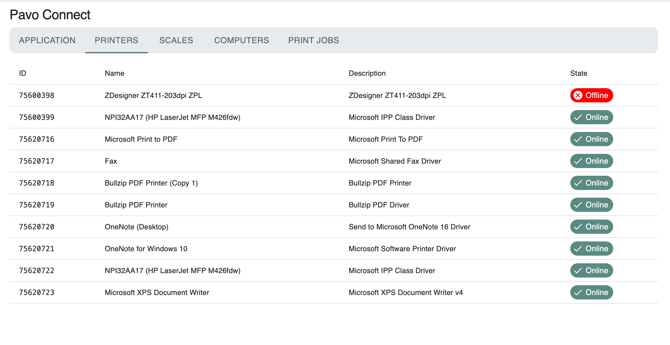
To view connected printers, go to Pavo Admin > Settings > PavoConnect > Printers. You can view your connected printers and see which are online.
Viewing Connected Computers
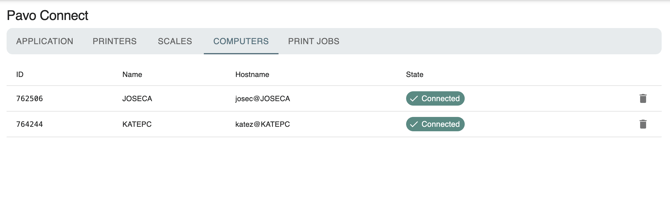
You can also install and view connected computers with your PavoConnect account. Click on the "Computers" tab to view which computers are online.
If you remove a computer from PavoConnect, it will no longer display on the list of printers or computers. This computer will not display again until it relaunches with the same credentials.
Viewing recent print jobs
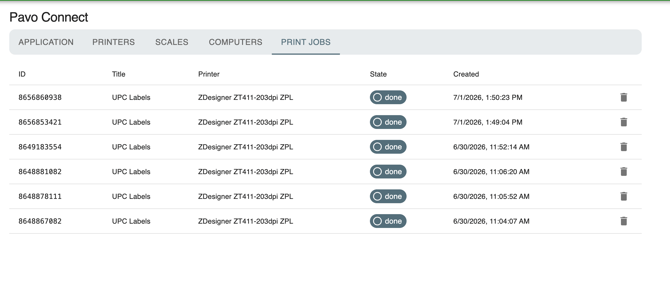
You can view recent print jobs sent to your printer. This is in the "Print Jobs" tab.
Note that usage is tracked under Pavo Admin > Settings > Account > Account & Billing to determine overages and setting a budget on how many print jobs can be sent.